Frequently asked questions
What the app does, what it costs, what happens to the things you write inside it, and how to cancel. The answers you'd normally have to dig out of the fine print.
What is Over It?
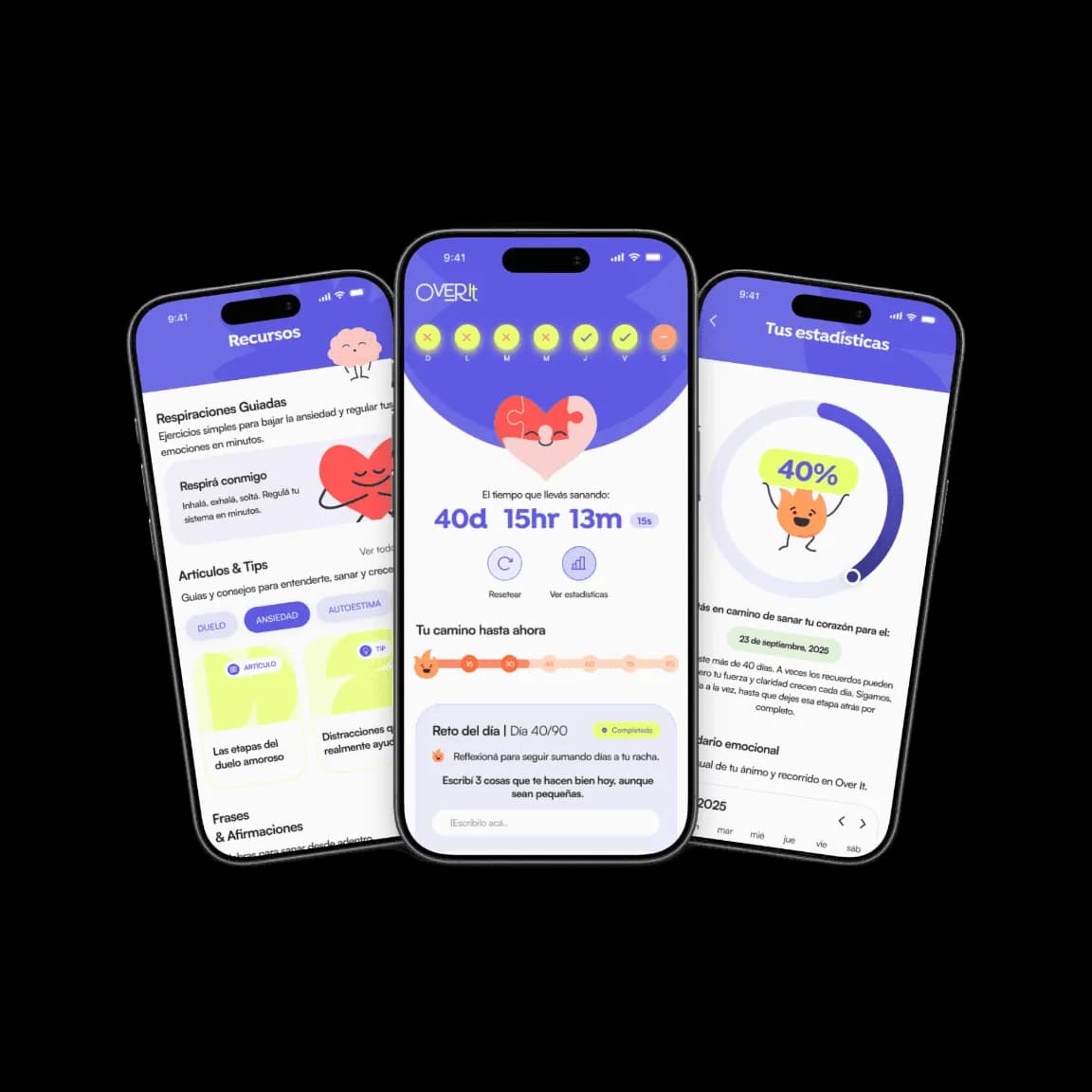
Over It is a self-help app for getting through a breakup. It puts in one place a 24/7 emotional chat with Ninety, an anonymous community, guided breathing, daily challenges, a panic button for the moment you're about to text your ex, an emotion tracker and articles by category. It runs on iPhone and iPad, in English and Spanish. It's support, not treatment.
Over It is built for the stretch when the breakup still hurts every single day: the nights you don't sleep, the urge to text, the pull to check their stories one more time. It doesn't promise a timeline or an outcome. What it gives you is something concrete to do with all of that at three in the morning, when there's nobody left to call.
One clarification, because the name gets crowded: Over It is also a Summer Walker album, a US marketing agency and several unrelated songs. This page is about Over It, the breakup recovery app published on the App Store. The long version is on what Over It is.
What does the Over It app include?
Over It includes eight features: the chat with Ninety, the anonymous community, guided breathing, daily challenges with a streak, the panic button, the emotion tracker, short supportive writing and articles by category. There are no sessions with professionals, no video calls and no plan put together for you by a person. Everything the app offers, you use on your own, when you need it.
- Ninety — an emotional chat open 24 hours a day. It runs on artificial intelligence: not a person, not a therapist.
- Anonymous community — posts from other people going through the same thing, with no names attached.
- Guided breathing — three modes: crisis, calm and sleep. Crisis is for when your body speeds up; sleep is for the long nights.
- Daily challenges — one small action a day, with a streak and a counter of days since the breakup.
- Panic button — a guided interruption for the exact moment you're about to text: it shows you your own reasons before you do it.
- Emotion tracker — a calendar of how you've been feeling, useful for seeing movement when from the inside it looks like there is none.
- Supportive writing — short pieces to read during the day.
- Articles and resources — by category: Anxiety, Self-esteem, Relationships, Science, Grief and New Horizons.
Part of the written material also lives outside the app, free and with no account, in Resources. If you want to see the tone before downloading anything, start there.
Is Over It free, or do you have to pay?
Downloading Over It is free and full use runs on a subscription. Plans are monthly and 90-day, and the price changes by country, currency and whatever promotion is running, so you won't find a number on this page. The price that counts is the one the App Store shows you on the confirmation screen, before you pay.
Plenty of apps publish one price on their website and charge another. That happens because App Store amounts get adjusted by country, currency and local taxes, and because promotions come and go. So there's no figure here — the only one that matters is the one on your phone. Before you confirm, that screen tells you three things worth reading properly:
- Which plan you're about to buy: monthly or 90-day.
- Whether there's a trial period, and the exact date it ends.
- The date of the first automatic renewal and the amount that will be charged.
Apple processes the purchase, not Over It. That means billing, charges, renewals and refunds are all handled through the App Store, with the same Apple Account you use to buy anything else.
How do I cancel my Over It subscription?
You cancel an Over It subscription from your Apple Account, not from inside the app: open Settings on your iPhone, tap your name at the top, then Subscriptions, choose Over It and tap Cancel Subscription. Do it at least 24 hours before the renewal date. You keep access until the period you already paid for runs out.
- 1
Open Settings
On your iPhone or iPad, open the Settings app. Don't look inside Over It for this: the subscription doesn't live there.
- 2
Tap your name
It's the first thing in the list, at the very top, with your Apple Account photo next to it.
- 3
Go to Subscriptions
You'll see every active and expired subscription on that account. Choose Over It.
- 4
Tap Cancel Subscription
Confirm. If the button isn't there, it's already cancelled — all that's left is the date your access ends.
Cancelling the subscription doesn't delete your account or your data, and deleting your account doesn't cancel the subscription. They're two separate things, and if you want to leave completely you have to do both.
What happens to what you write in Over It?
What you write in Over It — conversations with Ninety, mood entries, community posts — is stored in your account so you can read it back, and you can delete it whenever you want. Over It does not sell that data and does not use your conversations to train artificial intelligence models. To generate replies, the content of your messages passes through third-party AI providers under confidentiality agreements.
- Account data: your email and, depending on how you sign in, your Google or Apple identifier.
- What you create in the app: conversations with Ninety, mood entries, challenge responses and community posts.
- Technical data: device model, language, app usage and crash reports.
Two things Over It doesn't do, written into the privacy policy and not only here: it doesn't sell your data, and it doesn't use the content of your conversations to train artificial intelligence models, its own or anyone else's.
Conversations aren't read routinely either. A small group of people on the team, bound by confidentiality, can access fragments only to investigate a technical problem, an abuse report or a safety risk.
Frequently asked questions
Is there a free trial of Over It?
Sometimes there's a trial or a promotion and sometimes there isn't: it depends on the country and the moment, so no general answer stays true for long. The only reliable place is the App Store screen where Apple asks you to confirm — it says whether there's a trial, how long it lasts and when the first charge lands. If there is one and you don't cancel before it ends, it turns into a paid subscription automatically.
Do I get money back if I cancel halfway through?
Cancelling stops the renewal going forward; it doesn't return what you've already paid, and you keep access until the period you bought runs out. Refunds are Apple's decision, not Over It's, because the purchase is processed through the App Store. You request one at https://reportaproblem.apple.com with the same Apple Account you bought with, and Apple grants or refuses it under its own policies.
Do I need an account to use Over It?
Yes. Over It asks you to create an account with email, Google or Apple, because your progress, your conversations and your challenge streak live there, and that's how they come back if you change phones. The app is for people aged 18 and over. If you sign in with Apple you can use Hide My Email: Over It receives a forwarding address instead of your real one.
You're going through a breakup. You're not in this alone.
Over It is a guided path out of a broken heart, one day at a time.